You see your online marketing budget draining quickly through PPC, while it brings zero results in your sales. Sounds familiar? Many business owners think that paid search ads aren’t just for their industry, or they just don’t actually know how it all works. But it’s actually simple once you get the idea, and yes, it works for all major brands, depending on their goals.
The paid ads based on PPC actually work on clear rules of search intent. When your ads aren’t bringing in the sales you imagined it to bring, it’s usually because of a few setup errors that can be easily fixed. Read this guide to the end to discover those common setup errors and fix your Google Ads not working problems.

Why Is Google Ads Not Working? How to solve it?
Google Ads campaigns usually fail to bring clear conversions mainly for three reasons. Firstly, you might be driving the wrong traffic with broad keywords – people who are just there to browse things without any apparent intention of buying. Secondly, a problem on your landing page may be turning away customers who are ready to buy. And finally, if your conversion tracking link is broken for any reason, Google Ads is not able to access the data it needs to bring you more customers. The only way out of this is to find and fix the problems these problems.
| Failing Stage | First Indicator | Root Cause of it | How to Fix? |
|---|---|---|---|
| Traffic Quality | High clicks but zero sales | Too Broad keywords | Add exact match keywords |
| Ad Relevance | Low click-through rates | Normal ad copy | Emphasize the unique value you provide |
| Post-Click Experience | High landing page bounce | Mismatch in core message | Make headlines consistent with Ad |
| Data Feedback | Algorithm targeting wrong users | Broken conversion link | Re-taging |
10 Common Google Ads Mistakes Wasting Your Budget
- Relying Exclusively on Pure Broad Match Keywords
Targeting Broad Match keywords makes Google show your ads to those people who are searching for terms that are only loosely related to what you actually offer. And thus, your budget ends up getting spent on people who are just looking for free guides, job openings, or random research. A better way to capture your target audience is to mix exact-match keywords with long-phrase keywords to keep it sharp and goal-oriented.
- Neglecting Negative Keyword Lists
Negative keywords are as important as the direct keywords you use. If you do not have a solid list of negative keywords, you’ll end up paying for totally irrelevant clicks. For instance, a software company might end up paying for searches when people are just searching for a customer service support number. So, make sure to check your search terms reports weekly to clean these up.
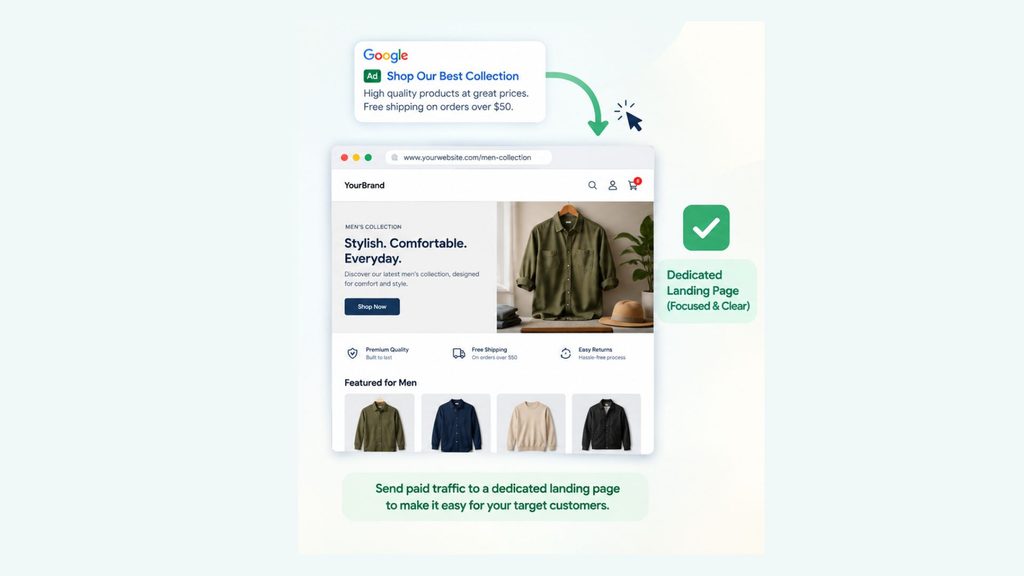
- Sending Paid Traffic to the Homepage
One of the most common mistakes people make is sending their paid traffic to the homepage. Your homepage has way too many distractions and random links, which just confuses your target customers. When people click your ad, they’re looking for a specific product or service, so make it easy for them by linking ads directly to your landing page.
- Ignoring Conversion Tracking Setup
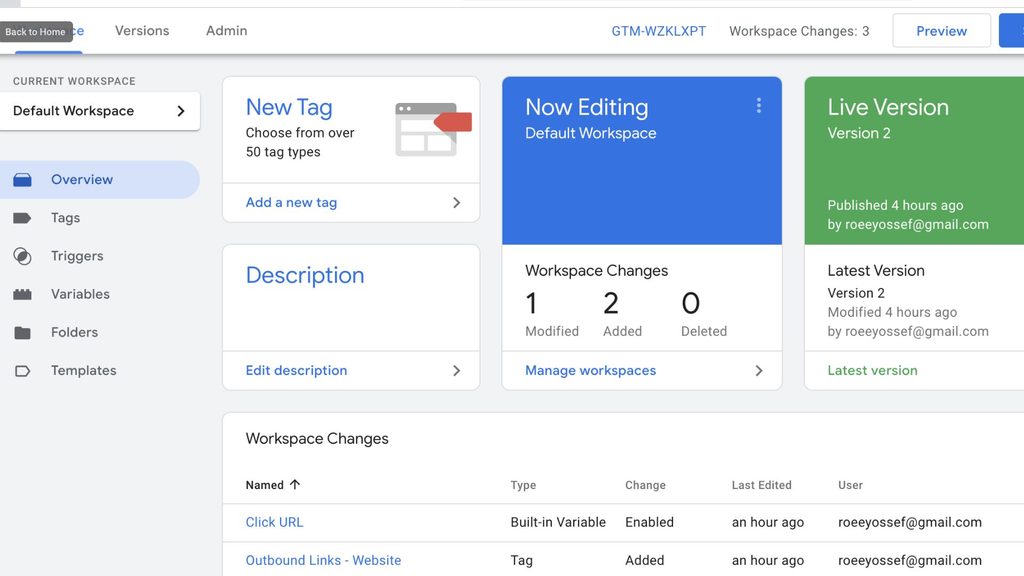
Google has smart bidding algorithms that need accurate data to work their magic. So, if you by any chance miss setting up conversion tracking tags properly, the system will basically work blind instead of bringing you real sales or leads.
Make sure you set up Google Tag Manager properly so it tracks what actually matters to your business, whether that’s sales, more enquiry form fill-ups, or just a phone call. Checking these tags regularly ensures that you’re feeding the right data to Google for real results.
- Writing Generic and Boring Ad Copy
Bland ad headlines don’t just do their work these days. If your ad copy doesn’t clearly show what makes your offer unique or just doesn’t give people a strong reason to buy, they will just scroll past your ads to find something else more interesting.
This has a direct impact on your click-through rate; if your CTR is not up to the mark, Google will label your ad as less relevant. To fix it easily, just add serious value to your copy by clearly highlighting real benefits, transparent pricing, and reasons that convince customers to choose your product over anyone else’s.
- Bundling Search and Display Networks
Search ads are meant to catch the attention of people who are actively looking to buy a certain product right away. Whereas display ads target passive web browsers and app users who are just scrolling through without any intention to buy.
So, when you combine both of them into the same ad campaign, you end up wasting your budget because it brings accidental display ad clicks rather than high-intent customers. Always keep them separate, and also make sure to turn off the Display Network setting in the dashboard of your online ad campaign.
- Target Location Misconfigurations
By default, Google Ads usually targets people who are simply “interested in” your location and the service or product. So, it often ends up showing your ads to international users who are just searching for your city. A local plumber, for example, shouldn’t be paying for clicks from someone thousands of miles away who is just interested in the location.
To fix this, update your location settings so your ads target only people who are physically in your location and are searching for something there.
- Weak Landing Page Offer and Slow Load Times
Your ad makes a promise to the target audience, and your landing page is there to deliver on it immediately. If your page loads very slowly, your potential buyer will just bounce before they even see what you’re offering. Remember, even a three-second loading delay can cost you half your traffic. - Setting and Forgetting Smart Bidding Strategies
Automated bidding strategies need time and a solid dataset to actually work. If your ad campaign account is brand new, it will not have enough conversion history to work for strategies like Target CPA. This will directly impact your ad spending.
The best strategy for a brand launching a new paid ad campaign is to begin with Manual CPC or Enhanced CPC to establish a reliable baseline first. Once you’re consistently getting at least around 30 conversions a month, then you can safely switch over to automated bidding.
- Overlooking Device and Schedule Adjustments
Conversion rates are really dynamic. They can vary wildly according to the devices and the time of day. For example, mobile users will immediately leave if your checkout forms are really annoying to fill out on a phone, or B2B companies sometimes waste their marketing money by running ads late on weekends when no one is really working.
If you want to make sure you are not making these mistakes, try looking at your data split by device type and campaign time. Once you see what is not working, simply lower your ad spending during those off-hours or on devices that are not driving any sales.
Step-by-Step Checklist to Improve Google Ads Performance
You can follow this checklist to identify and fix any issues in your ad accounts that are affecting your sales.
| Main Areas to Check | What to do? | What can it improve? |
|---|---|---|
| Search Query Audit | Review search terms and add negative keywords | Cuts unwanted ad spending by 20% to 40% |
| Match Type Strategy | Shift broad keywords to long phrases and exact match keywords | Increases quality of leads |
| Location Settings | Set it such that it only targets the target areas | Removes out-of-market unnecessary clicks |
| Landing Page Speed | Compress image files and remove unwanted codes | Lowers bounce rates and increases conversion rates |
| Ad Assets Expansion | Add sitelinks, callouts, and structured snippets | Improves ad ranking |
How Quality Score Impacts Advertising Costs
Google usually gives every active keyword a Quality Score from 1 to 10 to decide where your ad should show up and how much you pay per click. This score takes three main factors: your expected click-through rate, how relevant your ad is, and how good your landing page experience is.
A high Quality Score means you can get big discounts on your cost per click. A low score, on the other hand, makes you pay higher for normal ad placement. The best way to increase your score over time is to group your keywords into proper and highly focused themes.
Frequently Asked Questions
Why are Google Ads clicks not turning into sales?
Ad clicks often fail to convert into sales for many reasons, such as when your landing page doesn’t match what the target audience is actually looking for, has slow page load times, or has unclear calls to action.
How long does it take for Google Ads to start working?
Campaigns usually need about two to four weeks of active data to start working properly. Google’s Smart Bidding algorithms rely especially on this initial data to figure out what works and to effectively optimize your ad targeting.
What is a good conversion rate for Google Ads?
Average conversion rates across most niches usually hover between 3% and 5%. However, accounts that routinely test and optimize their campaigns can achieve conversion rates above 8%.
How much budget is needed to properly test Google Ads?
For an effective test, you’ll need a budget that covers at least 10 clicks per day. A rule of thumb is to set a monthly budget that equals roughly 30 times your target cost per click.
Why did Google Ads suddenly stop generating leads?
A sudden drop in performance usually points to broken conversion tracking tags or competitors increasing their bids to outrank you. Also check your search terms report for irrelevant traffic and verify your billing status to make sure there is no account issue.
Leave a Reply